
 Online Dating Coach
Louis Farfields
Dec 2, 2024
Online Dating Coach
Louis Farfields
Dec 2, 2024
Tinder is an online dating platform that’s available on desktop, tablet, or any mobile phone.
However, to match and chat with someone, you DO need a Tinder account first. This article will show you how to make your Tinder account via your phone or computer, using either Facebook or your phone number.
In this article:More...
I'm currently letting guys use my personal Profile Checklist for free. It'll turn your boring profile into a magnetic and attractive eye-catcher.
Get it for free!Creating a Tinder account via the Tinder app
There are two ways to download Tinder. One is the phone app, the other is the online web portal using Tinder.com.
1. Download the Tinder app
If you’re using a phone or tablet, here’s how to download Tinder.
You can download Tinder on iOS using the app store, or Google Play if you’re using Android. Just type “Tinder” in the search bar on your app store and it will come up, and then hit “install.”
Alternatively, you can visit Tinder.com to log in and use it on your web browser.

Pro tip: don’t use incognito mode or you’ll have to manually fill in your account name and password again.
(Better to reserve those private browsing sessions for those special late night moments between you, your sock, and a half bottle of skincare lotion).
2. Click “Log in with Facebook” or “Log in with Phone Number”
If you already have an account, you can log in using either of these two methods.
Logging in using Facebook will allow you to upload photos from Facebook. But you’ll have to upload photos you have saved on your device if you log in using a phone number.
Once you log in, you’ll be met with a screenshot like this.

Fill in the info and then hit “continue” to move on to the next step.
Side note. If you just want some more basic Tinder Profile tips and prefer video to reading, I have the perfect video for you.
13 Tinder Profile Tips For Guys (Double Your Matches in 2024)
3. Enter your phone number and verification code
You’ll need a phone number or Facebook account for this step.
Once you’ve filled in the info from the last step, you’ll be asked to input your phone number to receive a verification code. And don’t worry, Tinder keeps it private. They won’t be writing it on the inside of some bathroom stall saying “Call for a good time.”
Input you phone number here:
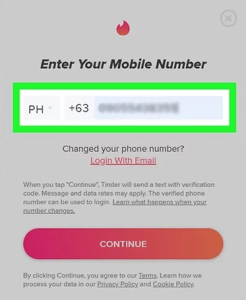
Then you’ll get sent a verification code to input here:

NOTE: Sometimes the verification code is automatically input, so you won’t have to input the code manually.
Did you use Facebook to create your account? Then your screen will look like this:

Just hit “Continue” and move to the next step. This will allow Tinder access to your Facebook information so it can create a profile.
If your Facebook login information isn’t saved on your phone or tablet or computer, you’ll first enter your Facebook email address and password.
4. Enable location
This step is easy.
Just hit “Allow Location.”
This allows Tinder to set your location to the area where you are, so you can match with people who are also in your area.

You MUST have this feature turned on, or else Tinder won’t work. That means you won’t get to see any potential matches who are dying to go on a date with you.
If, however, it IS turned on and you’re not getting any dates, I suggest checking my article below to vastly improve your Tinder Profile.
5. Enable notifications (or not)
You’ll be hit with one more prompt here to enable notifications.
If you want to be notified when you get a new match or message from Tinder, hit “Enable.” If not, click “Not Interested.”
Your account will now be created and a short tutorial will show you how you can navigate the app!
Two more steps left my Tinder bro!
6. Upload your best photos
Now for the fun part.
Uploading your best photos onto Tinder.
You won’t get any matches if you don’t upload some great photos onto your Tinder profile.
The better the photos, the more matches you’ll get. So be sure to include a mix of pics that show off your face, interests, and hobbies. The goal is to give people an idea of what it might be like to hang out with you.
This way people that dig your vibes will want to connect with you.
For more details on which pictures work best, check out this article I wrote.
Shooting the Perfect Tinder Profile Picture
7. Fill in your bio, prompts, and personal info (optional)
This step is optional, but recommended to get more matches on Tinder.
Fill in your bio, prompts, and personal info.
What you put in your Tinder bio is completely up to you. You can write something witty, funny, or long and meaningful. I do, however, recommend you don’t put something down at random.
Always use your bio and prompt answers to share something about your personality that your photos don’t. This way you give profile visitors a balanced look of who you are.
Prompts and bios also serve as easy conversation starters.
Lastly, fill in some of the basic info on Tinder, such as what you’re looking for, interests, and height (iF ThaT mAtTeRs).
People also want the general information about you as a person. Filling these in helps build trust and comfort, which ultimately leads to more matches, and more dates.
Frequently Asked Questions
What information do I need to create a Tinder account?
The only information you’ll need is an email, phone number, and/or Facebook account in order to get an account set up.
How do I verify my account?
To verify your Tinder profile and get the blue check, you want to follow these steps:
- Tap the profile icon. It’s at the top left of your Tinder screen.
- Select the gray checkmark. Next to your name and age.
- Hit ‘continue.’ You’ll see a pop-up with the title ‘Get Verified.’ Place your face inside the oval or copy the pose. There are two verification methods, but both give you the same results.
- Follow the prompts. Your selfie will now be compared to your existing profile photos using a combination of AI technology and human assistance.
For more information on verifying your Tinder account, read my quick article on it.
● How To Get Verified On Tinder in 2024 (3X More Matches)
Is Tinder free to use?
Yes, Tinder is free to use, but it has limitations, such as limited swiping.
Tinder also has premium services, like Gold and Platinum, which can offer more benefits, like unlimited swiping, priority likes, and seeing who liked you.
You can also purchase things like Boosts and Superlikes as well to increase your odds of matching with someone.
I go into detail on which of these are worth buying, and which aren’t, as well as what each premium package offers in terms of benefits.
Check it out here.
Will my friends know if I’m on Tinder?
Fear not, your friends won’t know if you’re on Tinder unless you tell them, or if they see you in their swipe stack while they’re on Tinder.
But don’t worry, you can also hide them from seeing you if you see them first, using a sort of ‘block’ feature on Tinder.
You have free range to swipe in private. 🙂
I've put together 10 Texts that always work. Copy-paste lines that instantly attract her and make her crave your attention. They work and they are free.
Get them for free!Create Tinder account – Conclusion
Those are the quick and easy steps to create your Tinder account.
Now, you may be thinking, “Well that’s great, but I don’t even know how to text people to go on dates.”
I have just the thing to solve your plight.
10 copy-pastable texts that I’ve used over and over and over again that WORK. They’ll get your matches laughing, intrigued, and more interested in you.
You can get it all for free by hitting the big button below. Click it now to get instant access and start using them on Tinder asap.
Enjoy.
Blessings,
Louis Farfields
And don't forget your download below ;)

Write a comment